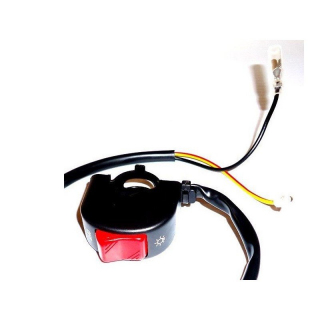



Mapping button RFX Race - OEM type

| BRANDS | RFX |
|---|---|
| EAN | 5056070622524 |

PROMO
was €52.00 Special Price €47.83
SKU
1128598
Shipped within 48h
| Brand | Cylinder | Model | Year | Caractéristique |
|---|---|---|---|---|
| SUZUKI | 450 | RM-Z 450 | 2018 | |
| SUZUKI | 450 | RM-Z 450 | 2019 | |
| SUZUKI | 450 | RM-Z 450 | 2020 | |
| SUZUKI | 450 | RM-Z 450 | 2021 | |
| SUZUKI | 450 | RM-Z 450 | 2022 | |
| SUZUKI | 450 | RM-Z 450 | 2023 | |
| SUZUKI | 450 | RM-Z 450 | 2024 | |
| SUZUKI | 450 | RM-Z 450 | 2025 | |
| SUZUKI | 450 | RM-Z 450 | 2026 | |
| SUZUKI | 450 | RM-Z 450 | 2027 |
Description
Tonnycat vous propose :
Mapping button RFX Race - OEM type de RFX
The buttons and switches in the RFX Race series are OEM-type replacement parts. They come with the same fittings, fastenings, connectors, and cable lengths as the original part.
Available for a wide range of motorcycles.
- OEM replacement
- Accepts all original connectors
- OEM cable length
Installation instructions:
- Start by removing the front plate.
- Carefully cut the cable ties holding the start and stop switch cables to the handlebars, then unscrew the clamps and let them hang.
- Locate the switch connector on the motorcycle, they are often found near the steering column on the frame, but sometimes under the tank.
- Detach the connector and remove the switch, noting the wire routing.
- Clean the connector using an electrical contact cleaner.
- Secure the new switch lightly on the handlebar at the desired location.
- Route the wires as on the old switch and reconnect the connector.
- Check the freedom of movement of the wires by turning the handlebars fully and ensuring the wires are not too tight, adjust if necessary.
- Reposition the cable ties on the wires, placing the cables behind the bars to avoid damage from debris.
- Reinstall your front plate.
| BRANDS | RFX |
|---|---|
| EAN | 5056070622524 |

Soyez le premier à poser une question sur ce produit !